Breaking WidgetKit Limits: Zero-Loss Vector Rendering and Concurrent Animations in Pure SwiftUI.
Multi-Threaded Vector Animation and Parametric Morphing in iOS Widgets.
This article shatters the established stereotypes regarding the static limitations of mobile app widgets and proves that fluid, continuous native animation is a reality. This approach demands a profound understanding of vector geometry and mathematics. Below, we detail how to implement interactive multi-threaded rendering, zero-loss scaling, and instant state synchronization on the iOS Homescreen.
We present a complete technical teardown using a live, production-ready product—the Eme: Relaxing Animated Widgets app—which has officially passed App Store Review and is available for testing right now.
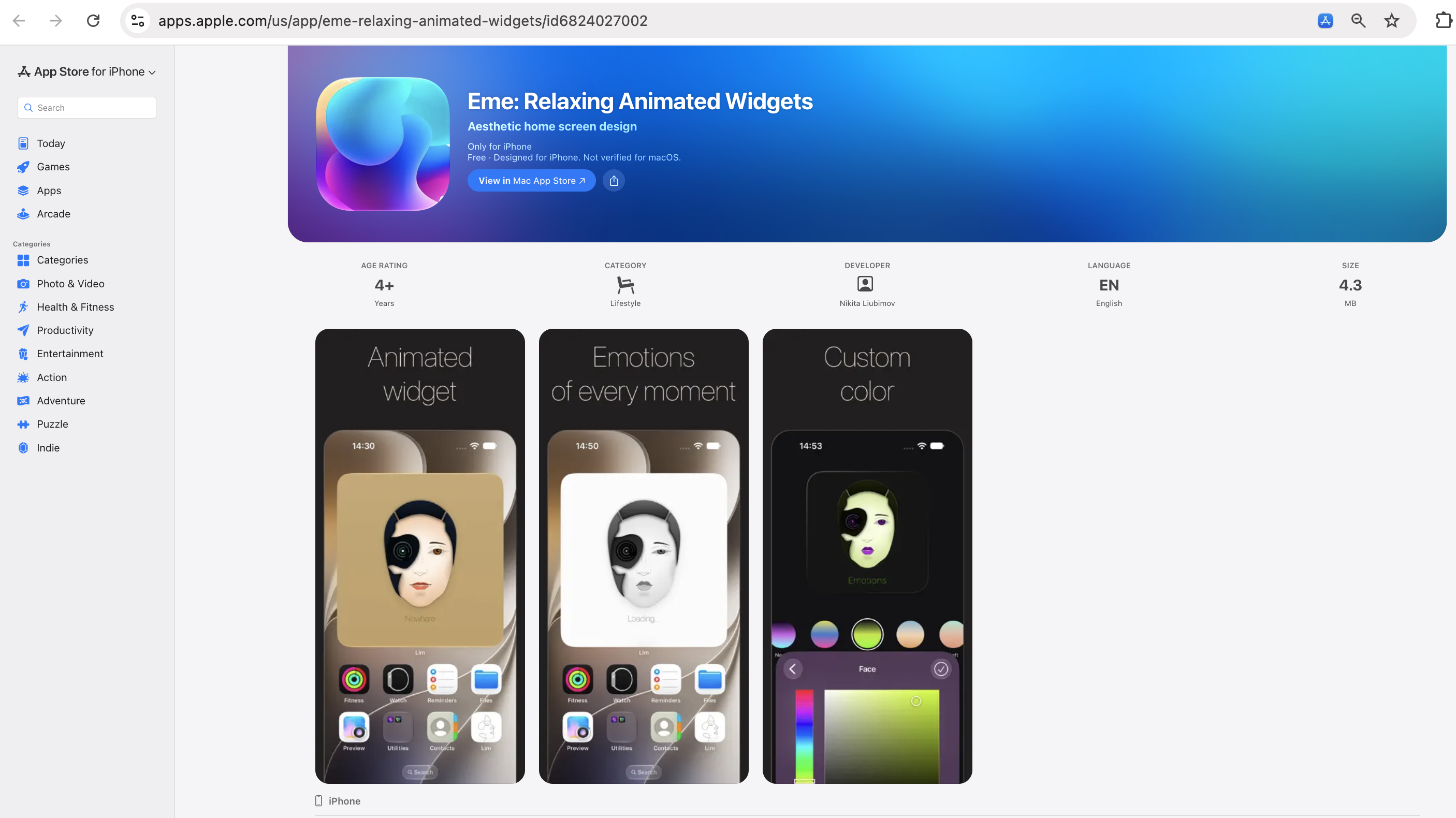
Part 1. The Vector Face: Multi-Threading & Granular Control
The core widget of the Eme app is an interactive face that demonstrates the absolute limits of complex shape rendering in WidgetKit. This component integrates several advanced architectural solutions.
Zero-Loss Vector Scaling
The app features zoom sliders that allow the user to magnify any part of the face and pan the focus to a specific element—for example, the right eye or the lips. The zoom coordinates are instantly passed to the widget. Because all graphics are drawn entirely via mathematics (using Bézier curves / Path), the widget maintains absolute line sharpness without the slightest pixelation, even at maximum zoom.
Granular State Control
Directly beneath the main preview in the app lies the color scheme configuration block. Users can not only select predefined presets but also granularly adjust every individual vector layer via a Color Picker. As soon as the user releases their finger, the parameters are instantly and independently saved and transmitted to the widget.
Parametric Morphing via AppIntents
Upon tapping the widget on the Homescreen, the geometry of the face fluidly morphs into an entirely new emotion. The structural changes of the right eye, the curvature of the lips, and the overall facial proportions are generated randomly and calculated in real time. This is not a pre-recorded video; it is pure mathematics that enables the generation of an infinite number of unique, seamless visual states directly on the user's desktop.
Concurrent Animation Threads
The major technological breakthrough becomes apparent when zooming into the left "cyber-eye". Upon closer inspection, you can see orbital rings continuously rotating around the central pupil. This orbital animation runs on its own looped timing cycle (spanning 1 to 2 minutes).
The architecture allows the orbits to rotate in a background loop, while the user can simultaneously trigger the interactive morphing of the entire face via tap. Both animations run concurrently and independently on the exact same widget without causing desynchronization.
Part 2. Geometric Morphing: Continuity & Synchronization
The second widget expands on this concept using abstract geometry. The engine mathematically recalculates the coordinates of intersecting circles, smoothly morphing them into hexagons and then into a complex system of squares. The animation lasts 1-2 minutes, continuously rotating the structure. There is no limit to the number of shapes or the degree of curvature.
- Zero-UI Interactivity (AppIntents): When the animation cycle concludes, the user simply taps the widget to restart the complex morphing loop directly on the Homescreen.
- Seamless State Transfer: The architecture allows dynamic color parameters to be passed from the app to the widget without halting the rendering process. The application of new parameters occurs without any interruption or skipping of the current animation cycle. The geometry continues its rotation from the exact millisecond it was at prior to the color change.
Part 3. Fundamental Architectural Specifications
- Offline-First Autonomy: Generating the animation requires zero internet connection. Data is neither fetched from servers nor rendered in the cloud. You can switch your device to "Airplane Mode", and all concurrent transformations, morphing, and color changes on the widget will continue to function flawlessly. The entire computational base resides strictly on the device.
- State Persistence: Widget states are never reset. If you change the facial emotion on the widget, this unique mathematical state is saved in the device's persistent memory. You can check the widget 5 days later, and the face will hold the exact same emotion until you tap it again.
- Zero Raster Hacks: What you see is physically impossible to achieve using PNG sequences, GIF files, or video fragments. We strictly do not use prohibited workarounds like forced redrawing via the
Text(timerInterval:)component. This is 100% Pure Vector Geometry. - Universal Placements (Homescreen, Lockscreen, Live Activities): This technology is not limited to the Homescreen. Because the rendering is written in pure SwiftUI, the mathematical animation is applied identically to Lockscreen widgets and Live Activities (including the Dynamic Island).
- Cross-Device Apple Ecosystem: The app and its animations can be tested on iPhone, iPad, and Mac. Furthermore, thanks to a unified SwiftUI codebase, this architecture is theoretically fully compatible with Apple Watch.
- Universal Triggers: The tap-based morphing shown in Eme is just one scenario. These animations can easily be triggered by in-app state changes, time intervals, system events, or Push Notifications.
- Perfect for Cross-Platform: All of this highly complex native logic can be effortlessly wrapped into an XCFramework and integrated into Flutter or React Native projects, giving cross-platform apps an unprecedented level of native visual responsiveness on iOS.
Open-Source Library: Test It Yourself in Xcode
Specifically for engineers and Chief Technology Officers (CTOs), we have created an open library in the form of a fully functional app, Limooonik, available directly on the App Store. It serves as an interactive catalog where you can test various animations (including the multi-threaded vector face) and adjust triggers and parameters in real time.
The core feature of this library is the ability to download the source code directly from the app. You can download the binary file (XCFramework) with a single tap, integrate it into your Xcode project, run Apple Instruments (profiler), and verify the architectural purity yourself. By checking the RAM and CPU consumption, you will see benchmark metrics that are physically impossible to achieve using raster hacks or hidden timers.
Download Limooonik on the App Store →Conclusion
We have practically proven that with the correct engineering approach, the Apple ecosystem is fully capable of sustaining highly complex multi-threaded animation and deep widget interactivity. The Eme and Limooonik applications are not just concepts—they establish a working standard for the next generation of B2B interfaces, ready for deployment in any corporate product.